Guide · Compress image
How to Compress an Image to 100 KB, 200 KB or Any Size
To compress an image to a size such as 200 KB, open Compress image, add the image, choose Target size and enter the limit. RMBG.me lowers the quality until the file fits and, only if needed, makes the image smaller in pixels. In our test, a 10 MB, 26-megapixel photo came out at 196 KB for "under 200 KB" and 99 KB for "under 100 KB".
On this page
Two ways to compress
| Choice | What it does | Use it when |
|---|---|---|
| Quality | Saves every image at the quality you set (82 % unless you change it) | You want smaller files and a good look, but have no exact limit |
| Target size | Finds the best quality that fits under the Maximum KB you enter | A form, portal or email says "under 200 KB", "max 1 MB" and so on |
Compress an image to a target size
Add your images
Open Compress image and click Choose images, drag files onto the page or paste an image. You can add up to 20 JPG, PNG, WebP, HEIC, GIF, BMP or AVIF images at once.
Choose Target size and enter the limit
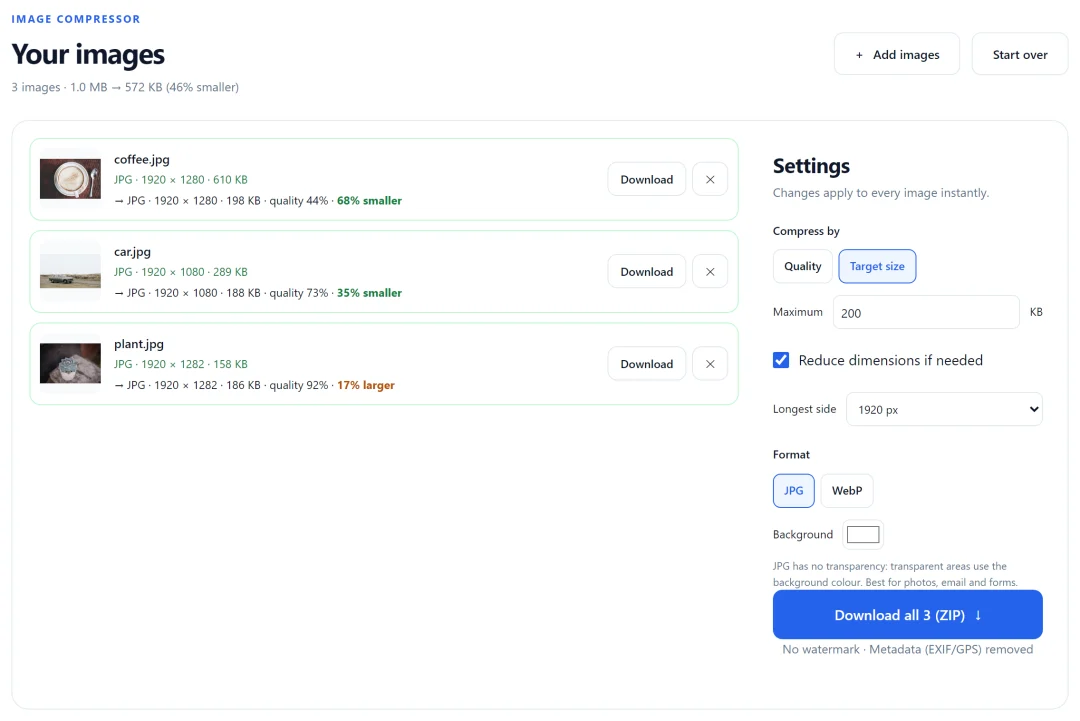
Under Compress by, choose Target size and type the limit in Maximum KB, for example 200. Every image is recompressed straight away.
Check the result line
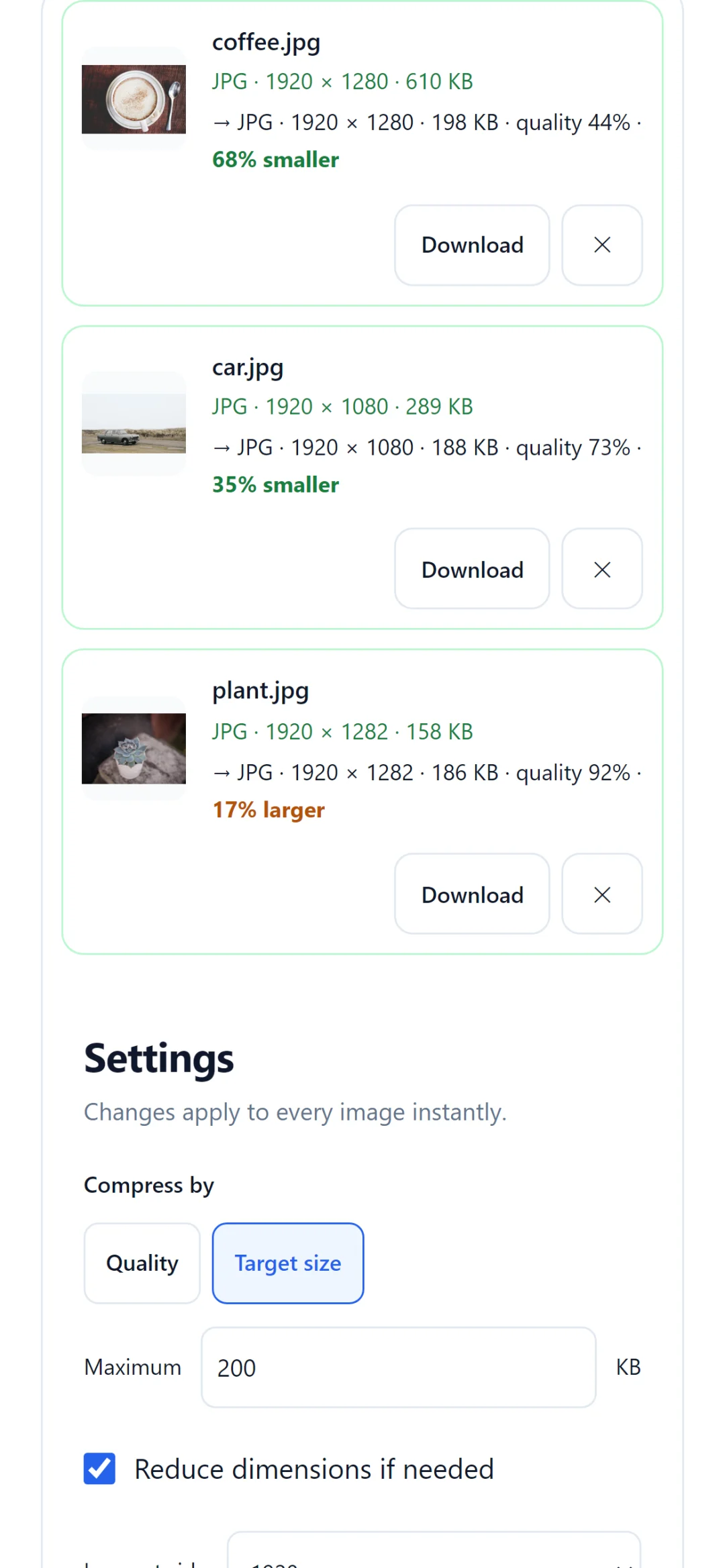
Each image shows its new size in pixels, its file size and the quality used, for example "→ JPG · 1920 × 1280 · 196 KB · quality 60%". If the image had to be made smaller to fit, the line says "Made smaller to fit under 100 KB".
Download
Click the download button on a line, or Download all (ZIP) for every image.
What happens to the size in pixels
File size depends on both the quality and the number of pixels. Two settings control the pixels:
- Longest side is 1920 px unless you change it, which suits websites, email and most forms. Choose Keep original to keep every pixel, or 3840, 2560, 1280 or 1024 px.
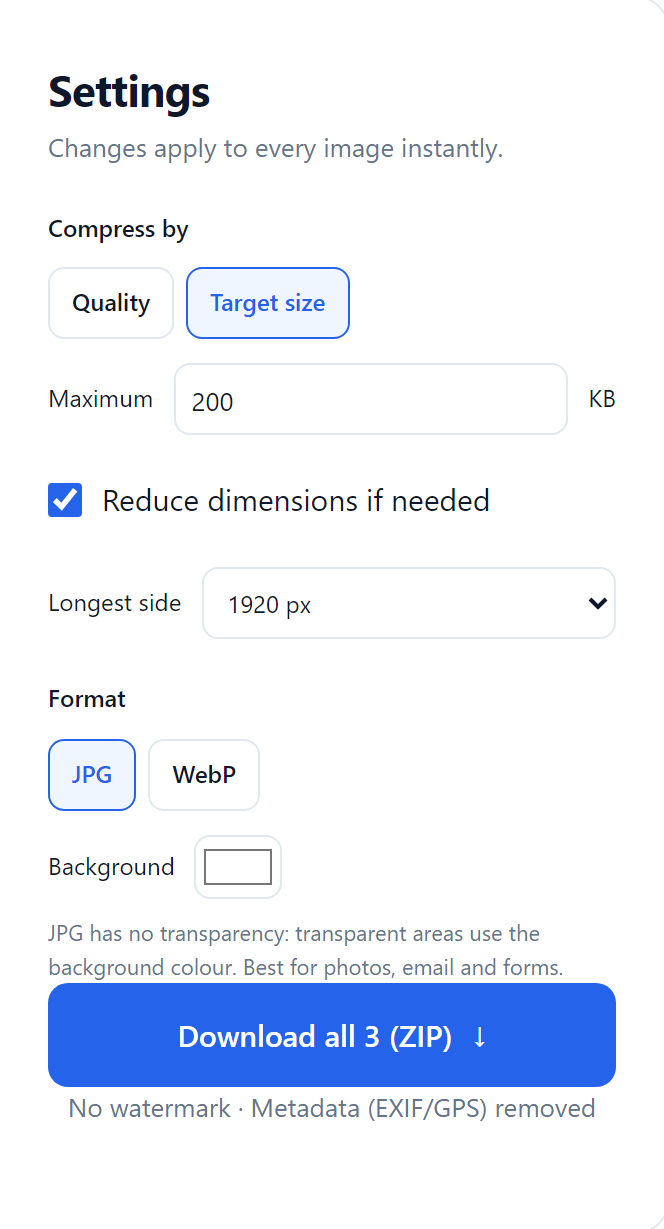
- Reduce dimensions if needed (on unless you untick it) lets a target size make the image smaller in pixels when lowering the quality alone is not enough. Without it, the line tells you the smallest size possible, for example "Smallest possible: 116 KB".
What we measured with a 6240 × 4160 photo of 10.2 MB:
| Setting | Result in pixels | File size | Quality used |
|---|---|---|---|
| Quality 82 %, longest side 1920 px (defaults) | 1920 × 1280 | 334 KB | 82 % |
| Target size 200 KB | 1920 × 1280 | 196 KB | 60 % |
| Target size 100 KB | 1632 × 1088 | 99 KB | 37 % |
| Target size 50 KB | 1179 × 786 | 49 KB | 32 % |
| Target size 50 KB, Reduce dimensions off | 1920 × 1280 | 116 KB (does not fit) | 30 % |
| Quality 82 %, longest side Keep original | 6240 × 4160 | 3.9 MB | 82 % |
JPG or WebP?
Compress image saves JPG unless you choose WebP. JPG is accepted almost everywhere, so use it for forms and email. WebP keeps transparent areas, which suits images for your own website. A transparent PNG saved as JPG gets a solid background; save it as WebP, or use Convert image to keep a PNG.
Supported files and limits
| Files you can add | JPG, PNG, WebP, HEIC, GIF, BMP and AVIF |
|---|---|
| Saved as | JPG or WebP |
| Images at once | Up to 20, up to 50 MB each |
| Image size | Saved at up to 64 megapixels (about 16 megapixels on iPhone and iPad) |
| Metadata | Camera details and GPS location are removed |
| Where it happens | In your browser: the images are not uploaded (in our test, nothing was sent to the server) |
Common problems and how to fix them
"Smallest possible: … KB"
The image cannot reach the target at its current size in pixels. Tick Reduce dimensions if needed, choose a smaller Longest side, or crop away what you do not need with Crop image.
The form still says the file is too big
The form may count 1 KB as 1,000 bytes. Set the target 5 % lower and download again. Also check that you uploaded the new file, not the original.
The photo looks blurry or blocky
A very small target forces a low quality. Use the largest limit the form allows, crop the photo to the part that matters, or lower the Longest side yourself: a smaller image at a good quality often looks better than a big one at a low quality.
The form asks for exact dimensions too
Use Resize image to set the width and height first, then compress. For photos of people with a set size, use the Passport-size photo maker; for signatures, the Signature maker.
On a phone
Compress image works in the phone's browser. Choose the photo from your gallery or files, set the target and download. On iPhone and iPad, very large photos are saved at up to about 16 megapixels.
Questions
How do I compress a photo to exactly 200 KB?
Choose Target size and enter 200 in Maximum KB. The result is the best quality that fits under 200 KB, so it is usually a little smaller, for example 196 KB.
Will compressing reduce the quality?
JPG and WebP compression removes detail you mostly cannot see at normal sizes. The lower the target, the more is removed. The line under each image shows the quality used, so you can judge before you download.
Does it change the size in pixels?
Only as you choose: by default the longest side is at most 1920 px, and a target size can make the image smaller to fit (untick Reduce dimensions if needed to stop that). Choose Keep original under Longest side to keep every pixel.
Are my photos uploaded?
No. Compression happens in your browser. In our test, compressing and downloading sent no image to the server.
Is the location removed from my photo?
Yes. Camera details and GPS location are not copied into the compressed image.
Can I compress a PDF the same way?
Use Compress PDF for PDF files.